> ## Documentation Index
> Fetch the complete documentation index at: https://docs.2extract.com/llms.txt
> Use this file to discover all available pages before exploring further.
# Understanding Protocols (HTTP vs. SOCKS5)
> Learn the difference between HTTP(S) and SOCKS5 protocols and choose the right one for your use case.
When you create a proxy in your 2extract.com dashboard, you can choose the protocol it will use: **HTTP(S)** or **SOCKS5**. While both allow you to route your traffic through our network, they work at different levels and are suited for different tasks.
## Quick Comparison
| Feature | HTTP(S) Proxy | SOCKS5 Proxy |
| :--------------------- | :--------------------------------------------- | :--------------------------------------------------------------- |
| **Traffic Type** | Only HTTP & HTTPS (web traffic) | TCP traffic (no UDP support) |
| **Anonymity** | Good (can see/modify headers) | **Excellent** (works at a lower level) |
| **Speed** | Generally faster | Slightly slower due to overhead |
| **Common Use Case** | Web Scraping, Browser Automation | Email clients, FTP, Non-HTTP apps |
| **Our Recommendation** | **Use HTTP(S) for 99% of web scraping tasks.** | Use SOCKS5 only if you have a specific need for non-web traffic. |
***
## HTTP(S) Proxies
The HTTP(S) protocol is the foundation of the web. An HTTP proxy is specifically designed to understand and handle web traffic (the requests your browser or scraper sends to websites).
### Key Characteristics:
* **Application-Level:** It operates at Layer 7 of the OSI model. This means it "understands" the content of your web requests and can interact with them (e.g., add or modify headers).
* **Optimized for Web:** Because it's specialized for web traffic, it's often faster and more efficient for tasks like web scraping.
* **Easy to Use:** Supported by virtually every web scraping library (`requests`, `Puppeteer`, `Scrapy`) and tool out of the box.
**For web scraping and browser automation, HTTP(S) is almost always the right choice.** It's simpler, faster, and fully supported by our entire feature set, including the Proxy Gateway parameters.
### When to use HTTP(S):
* Scraping websites
* Automating tasks in a browser
* Verifying ads on web pages
* Accessing web-based APIs
***
## SOCKS5 Proxies
SOCKS5 is a more versatile and lower-level protocol. Unlike an HTTP proxy, it doesn't understand the traffic passing through it; it simply creates a "tunnel" and passes along any TCP/IP traffic.
### Key Characteristics:
* **Transport-Level:** It operates at Layer 5 of the OSI model. It doesn't inspect or modify your traffic, making it more anonymous.
* **TCP-Versatile:** It can handle TCP-based internet traffic beyond just web pages, including email (SMTP), file transfers (FTP), and other non-HTTP protocols.
* **DNS Resolution:** SOCKS5 can handle DNS requests on the proxy server's side, which can prevent DNS leaks and enhance privacy.
UDP traffic is not supported over SOCKS5. Protocols that rely on UDP — such as HTTP/3 (QUIC), DNS-over-UDP, and WebRTC media — will not work through our SOCKS5 proxies. Only TCP-based connections are supported.
### When to use SOCKS5:
* When your application is **not** using the HTTP protocol (e.g., an email client, FTP, or other TCP-based tools).
* For tasks requiring the highest level of anonymity where you don't want the proxy to interact with your traffic at all.
* For applications requiring higher anonymity where you don't want the proxy inspecting your traffic.
## How to Choose in Your Dashboard
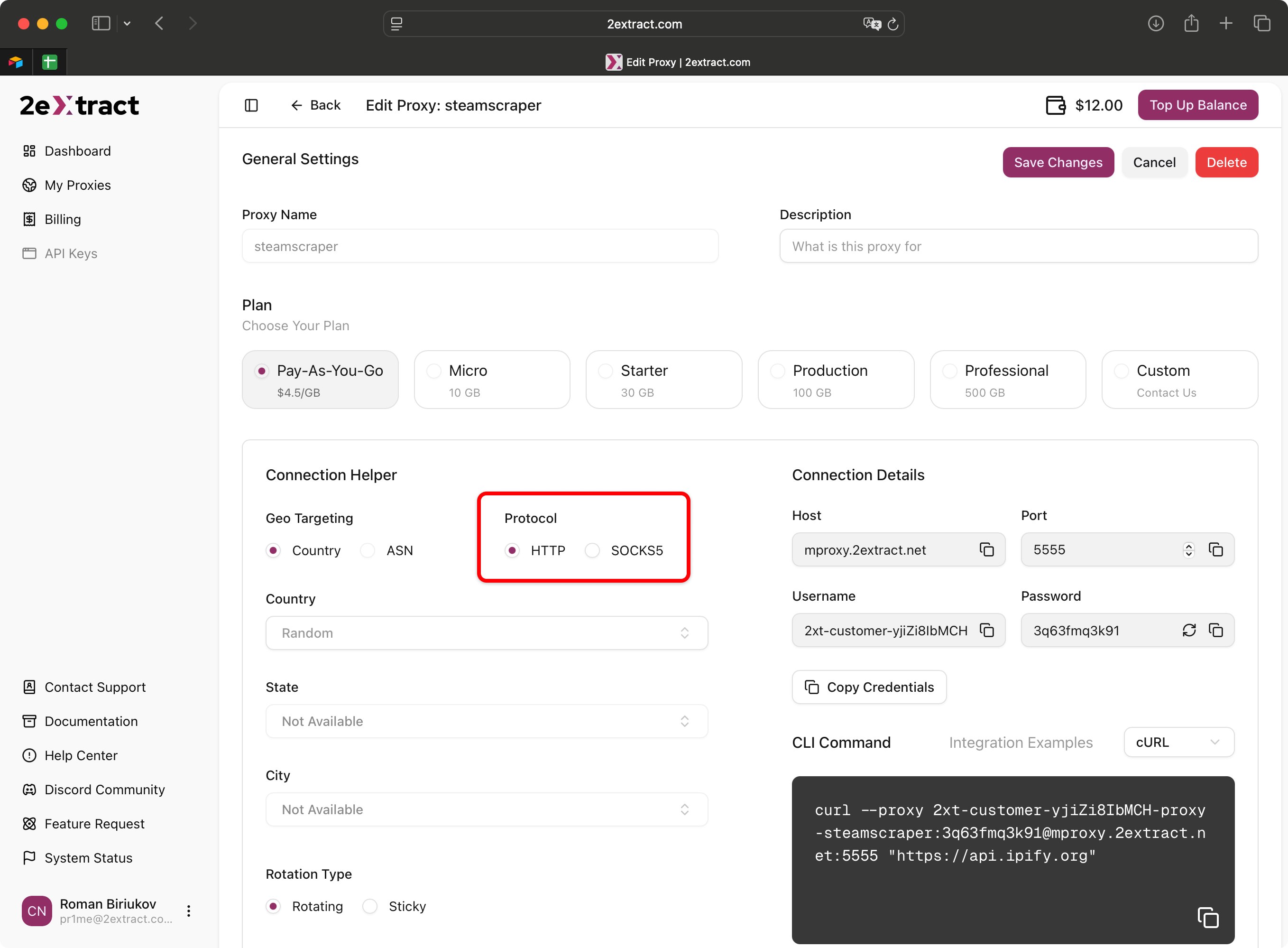
You can select your preferred protocol when creating or editing a proxy in the "Connection Helper" section of your **[Proxy Settings](https://2extract.com/app/proxy)** page.